Order Management Software Explained: Features, Pricing, Providers & Buying Guide
Managing orders involves more than recording a customer's request. Businesses need to track available inventory, confirm order details, coordinate deliveries, process returns, and keep records updated.
When these activities are handled across separate spreadsheets and applications, mistakes and delays can become difficult to manage.

Order Management Software helps organize these activities within a connected system. Depending on its features, it can track orders from placement to delivery, synchronize inventory information, coordinate fulfillment, and provide updates about order status.
Businesses of different sizes use these systems to manage orders from websites, physical stores, marketplaces, and other sales channels. Understanding the main features, pricing structures, provider types, and selection criteria can help businesses identify a system that matches their operations.
What Is Order Management Software?
Order Management Software is a digital system used to record, process, track, and manage customer orders throughout their lifecycle. It connects important activities such as order entry, inventory checks, payment confirmation, fulfillment, shipping, and returns.
For example, a retailer receiving orders through a website and a physical store needs an accurate view of available stock. An order management system can help consolidate order information and coordinate updates between supported systems.
Some platforms focus on small businesses with straightforward workflows, while others support complex operations involving multiple warehouses, international shipments, and several sales channels.
The exact capabilities vary by provider. Before selecting a platform, businesses should identify which processes need to be managed and determine whether the system can integrate with their existing software.
Key Features of Order Management Software
1. Centralized Order Tracking
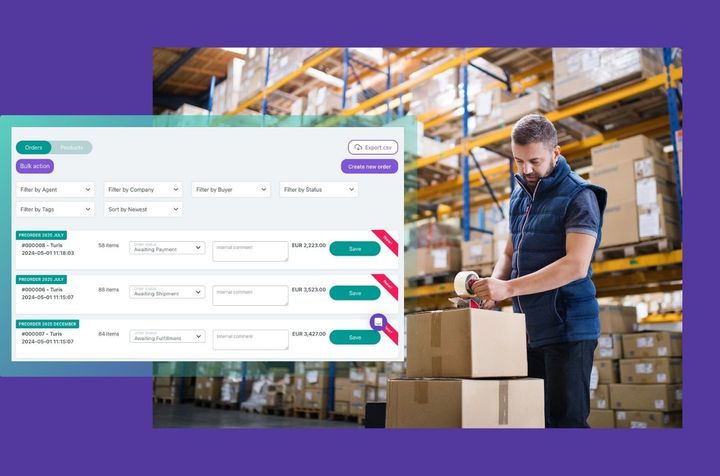
Centralized tracking brings order information together in one interface. Employees can review order details, payment status, fulfillment progress, and delivery information without checking multiple records manually.
This visibility can help teams identify delayed orders, investigate missing information, and respond to customer questions more consistently.
2. Inventory Management
Inventory features track available quantities, incoming stock, reserved items, and changes resulting from completed orders or returns.
When connected systems update inventory automatically, businesses can reduce discrepancies between recorded quantities and actual stock. However, the accuracy of these records still depends on correct data entry and reliable integration.
3. Multichannel Order Processing
Businesses may receive orders through online stores, marketplaces, physical locations, or direct sales channels. Multichannel functionality consolidates these orders into a shared workflow.
This can help teams manage orders consistently and reduce the need to transfer information manually between platforms.
4. Fulfillment and Shipping Coordination
Fulfillment tools help organize picking, packing, dispatch, and delivery tracking. Depending on the platform, users may generate packing documents, connect with shipping partners, or assign orders to suitable warehouses.
Businesses should confirm which shipping integrations are available and whether additional configuration is required.
5. Returns and Refund Management
Returns are a normal part of many retail operations. An order management system can record return requests, track returned items, update inventory, and coordinate refund workflows.
Clear records help employees understand the status of a return and identify whether an item can be returned to available stock.
6. Reporting and Analytics
Reporting features summarize order volumes, fulfillment times, inventory movements, cancellations, and other operational measures.
Managers can use these reports to identify recurring delays, compare warehouse performance, and investigate changes in order activity. Reports are most useful when the underlying records are complete and accurate.
Pricing Models and Budget Considerations
The financial structure of Order Management Software varies by provider, business size, and feature requirements. Understanding common pricing models helps organizations estimate the total financial commitment.
Monthly or annual subscriptions: Some providers charge a recurring subscription based on the selected plan, number of users, or available features.
Order-volume pricing: Certain systems base their charges on the number of orders processed during a billing period. Businesses with seasonal demand should check how higher volumes affect their charges.
Usage-based pricing: Some platforms calculate charges according to transactions, integrations, storage, or other measurable activity.
Implementation and integration expenses: Connecting the system to accounting software, marketplaces, warehouse tools, or existing databases may require additional configuration and technical work.
Additional feature charges: Advanced analytics, extra locations, premium integrations, or expanded support arrangements may be billed separately.
When comparing providers, review the full pricing terms rather than the advertised subscription alone. Consider implementation, training, data migration, ongoing maintenance, and future growth. A system with a lower initial subscription may require additional spending to support the required workflows.
Types of Order Management Software Providers
Providers differ in their primary focus and the types of businesses they support.
General Business Platforms
These systems support common order processing, inventory tracking, and fulfillment activities. They may suit businesses that need a central location for managing routine operations.
E-Commerce-Focused Platforms
These platforms concentrate on online orders, marketplace connections, shopping cart integrations, inventory synchronization, and shipping workflows.
They may be useful for businesses managing orders across multiple online channels. Compatibility with existing storefronts should be checked before selection.
Enterprise Platforms
Enterprise systems support more complex operations, such as multiple warehouses, regional distribution networks, large order volumes, and detailed approval processes.
Implementation may involve more planning because the system must fit existing business rules, data structures, and reporting requirements.
Industry-Specific Platforms
Some providers develop systems for particular industries, such as wholesale distribution, manufacturing, healthcare supplies, or food distribution.
Industry-focused features may address specific inventory rules, traceability requirements, or fulfillment processes. Businesses should confirm that these capabilities match their actual operational needs.
How to Compare Providers
A structured comparison can make the selection process easier.
First, review the provider's core features. Check whether it supports the required order channels, inventory rules, warehouse locations, returns processes, and reporting needs.
Next, examine integration capabilities. The system may need to connect with accounting software, customer relationship management tools, payment systems, marketplaces, and shipping partners.
Security is another important consideration. Review user permissions, authentication options, backup procedures, data protection practices, and the provider's approach to system updates.
Finally, investigate implementation requirements. Ask how long setup may take, what information is needed, whether historical data can be transferred, and what training is available. Reference materials and demonstrations can help clarify how the system performs in realistic situations.
A Practical Guide to Selecting the Right System
Step 1: Map Your Current Workflow
Document how orders move from receipt to delivery. Identify repeated manual tasks, common errors, delays, and information that employees struggle to locate.
Step 2: Define Essential Requirements
Separate essential features from optional ones. A small retailer may need accurate stock tracking and online order synchronization, while a distributor may require warehouse allocation and complex fulfillment rules.
Step 3: Prepare a Shortlist
Compare providers against your requirements, integration needs, expected order volume, and available budget. Avoid choosing a system based only on the number of features it lists.
Step 4: Test With Realistic Scenarios
Use a demonstration or trial environment to test common tasks. These might include processing a new order, correcting an address, updating stock, handling a return, and reviewing a delayed shipment.
Step 5: Calculate the Total Financial Commitment
Include recurring charges, implementation, training, integration work, maintenance, and potential expansion. Review contract terms, renewal conditions, and data-export options.
Step 6: Plan Implementation
Assign responsibility for setup, data validation, staff training, and testing. A phased rollout may reduce disruption by allowing the team to verify the system before moving every order workflow.
Common Challenges and Mistakes
One common mistake is selecting software before understanding the existing process. If workflows are unclear, a new system may reproduce the same problems in a different interface.
Poor data quality can also create issues. Duplicate product records, incorrect stock quantities, and inconsistent order information should be corrected before migration.
Another challenge is underestimating employee training. Staff need to understand how to process exceptions, correct errors, and follow the new workflow.
Businesses should also avoid overlooking future requirements. Consider whether the platform can support additional locations, new sales channels, higher order volumes, or changes in fulfillment arrangements.
Conclusion
Order Management Software helps businesses coordinate order processing, inventory tracking, fulfillment, returns, and reporting. The right system depends on operational complexity, sales channels, integration requirements, and financial limits.
Before selecting a provider, map current workflows, identify essential features, compare pricing structures, and test realistic order scenarios. Reviewing security, implementation, and future expansion requirements can also help avoid unexpected challenges.
A careful evaluation allows businesses to choose a system that supports accurate records, clearer order visibility, and more organized day-to-day operations.